Elasticsearch remote reindexing on play with docker
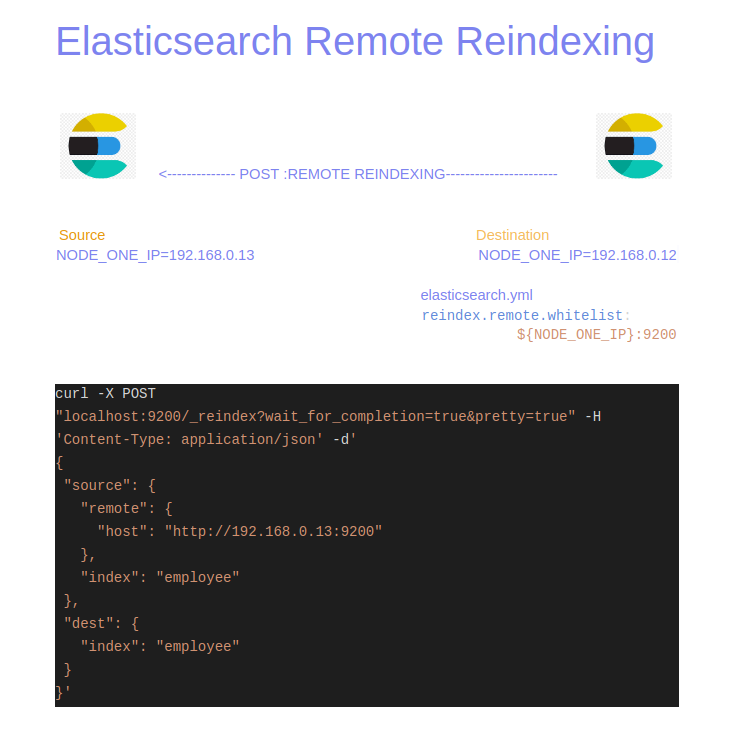
Play with docker to understand how the remote reindexing works in elastic search.
In this tutorial, we’ll be playing with the docker playground to understand the remote indexing with simple steps
Step 1: Setup the docker playground
- Create two instances in Docker Playground, also check with the tutorial on Play with Docker
Step 2: Create the files required in both the instances
- Create a
.envfile with the IP and the version of es we want to use. As on the current date, I am using `7.6.0` as the current version of elasticsearch in both the instances, update the IP based on your instances.
NODE_ONE_IP=192.168.0.13
NODE_TWO_IP=192.168.0.12
ES_VERSION=7.6.0
- Create a single node elasticsearch with the following
docker-compose.ymlin node one.
version: '3.7'
services:
elasticsearch-one:
container_name: elasticsearch-one
image: docker.elastic.co/elasticsearch/elasticsearch:${ES_VERSION}
ports: ['9200:9200', '9300:9300']
env_file:
- ./.env
environment:
cluster.name: "test-remote-cluster"
node.name: "es-node-one"
network.host: 0.0.0.0
network.publish_host: ${NODE_ONE_IP}
transport.host: 0.0.0.0
discovery.zen.minimum_master_nodes: 1
discovery.type: single-node
ES_JAVA_OPTS: "-Xms512m -Xmx512m"
xpack.license.self_generated.type: basic
volumes: - 'es_data:/usr/share/elasticsearch-one/data'
healthcheck:
test: curl -s https://localhost:9200 >/dev/null; if [[ $$? == 52 ]]; then echo 0; else echo 1; fi
interval: 30s
timeout: 10s
retries: 5
volumes:
es_data:
- Create a single node elasticsearch with the following
docker-compose.ymlin node two.
version: '3.7'
services:
elasticsearch-two:
container_name: elasticsearch-two
image: docker.elastic.co/elasticsearch/elasticsearch:${ES_VERSION}
ports: ['9200:9200']
env_file:
- ./.env
environment:
cluster.name: "test-remote-cluster"
node.name: "es-node-one"
network.host: 0.0.0.0
network.publish_host: ${NODE_TWO_IP}
transport.host: 0.0.0.0
discovery.zen.minimum_master_nodes: 1
discovery.type: single-node
ES_JAVA_OPTS: -Xms1g -Xmx1g
xpack.license.self_generated.type: basic
reindex.remote.whitelist: ${NODE_ONE_IP}:9200
volumes: - 'es_data:/usr/share/elasticsearch-two/data'
healthcheck:
test: curl -s https://localhost:9200 >/dev/null; if [[ $$? == 52 ]]; then echo 0; else echo 1; fi
interval: 30s
timeout: 10s
retries: 5
volumes:
es_data:
- Run the containers
docker-compose up -d - Check with the status of the containers with
docker pa -a
# NOTE: If you see the error related max virtual memory areas vm.max_map_count [65530] is too low, increase to at least [262144], run the following command and restart the container.
sudo sysctl -w vm.max_map_count=262144
To get a better answer for different environment use the Elasticsearch single node docker container for different environments
- Create settings and mapping file
employee.jsonfor creating index employee.
{
"settings": {
"index": {
"number_of_shards": 1,
"number_of_replicas": 0
},
"analysis": {
"analyzer": {
"analyzer-name": {
"type": "custom",
"tokenizer": "keyword",
"filter": "lowercase"
}
}
}
},
"mappings": {
"properties": {
"age": {
"type": "text"
},
"experienceInYears": {
"type": "text"
},
"name": {
"type": "text",
"analyzer": "analyzer-name"
}
}
}
}
- Create the topic with the above settings and mappings with
curl -vX PUT 'localhost:9200/employee?pretty' -d @employee.json --header "Content-Type: application/json"
With this, we are done with creating the two machines and the required configuration.
Step 3: Create sample data in node 1 and reindex in node 2 from node 1
Goto node 1 and insert the sample data
- Insert sample data into the Indice
curl -X POST "localhost:9200/employee/_doc/1005?pretty" -H 'Content-Type: application/json' -d'{
"name": "Jinna",
"age" : "29",
"experienceInYears" : "6"
}'
- Let’s insert another set of 1000 records with for loop
for i in `seq 1 1000`; do
curl -X POST "localhost:9200/employee/_doc/$i?pretty" -H 'Content-Type: application/json' -d'
{
"name": "Jinna$i",
"age" : "$i",
"experienceInYears" : "$i-1"
}
'
done
- Get the indices
curl -XGET "localhost:9200/_cat/indices?v" - Get count of the employee Indice
culr -XGET "localhost:9200/employee/_count?pretty"
# Output
curl -XGET "localhost:9200/employee/_count?pretty"
{
"count" : 1001,
"_shards" : {
"total" : 1,
"successful" : 1,
"skipped" : 0,
"failed" : 0
}
}
Goto node 2 and reindex from remote node 1
Run the following command to reindex from the remote
curl -X POST "localhost:9200/_reindex?wait_for_completion=true&pretty=true" -H 'Content-Type: application/json' -d'
{
"source": {
"remote": {
"host": "http://192.168.0.13:9200"
},
"index": "employee"
},
"dest": {
"index": "employee"
}
}'
Done
Comments
Join the discussionNo comments yet. Be the first to comment.